
PRACTICAL GEO WORKBOOK / ANSWEROVA
Generative Engine Optimization: Decide What to Fix Next
Generative engine optimization work starts with a decision: is the problem access, missing evidence, an unsuitable question, or simply too little data? Use this workbook to choose one page change you can verify.
By Answerova · Published November 21, 2026 · Practical workbook
01 / START WITH A QUESTION
Write the buyer’s decision before the prompt
Choose a question that could change a purchase or an inquiry. “Which supplier supports model X in France?” gives your team a clearer task than “Tell me about our brand.” Record the buyer, market, language and the decision being made.
Pick one experience, such as Google AI Overviews or Perplexity. A chat with uploaded documents tests a different source context from open-web discovery. Preserve the exact wording and context so someone else can repeat the observation.
Keep the evidence behind each decision
Download a blank CSV for exact questions, source URLs, blockers, owners and retest dates. It opens in Excel or Google Sheets.
02 / ROUTE THE FINDING
Choose the next action from the evidence
| What you observe | Check next | Acceptable next action |
|---|---|---|
| The page cannot be reached | Response, relevant crawler policy, canonical and verified request evidence | Assign a bounded technical fix and verify the affected URL |
| The answer cites the page but misstates a fact | Claim, supporting passage, source date and product-owner confirmation | Correct or clarify the authoritative passage with evidence |
| Competitors appear, but your page does not answer the question | Whether the page actually covers the buyer’s decision | Add independently useful, reviewed evidence to the right existing page |
| One sample differs from yesterday | Question, context, surface, market and repeated observations | Gather comparable observations before attributing a change |
| Citations increased, but inquiries did not | Tracked referrals, landing page and confirmed inquiry events | Inspect the visitor journey; do not report citation growth as revenue |
03 / UNDERSTAND THE BOUNDARY
A crawl is one step in the chain
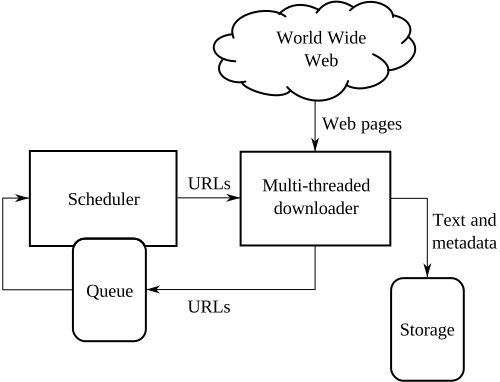
A crawler can download text without that page becoming a supporting source for a particular answer. The diagram shows the retrieval side of the system, not a promise of citation.
Keep three records apart: whether the page is accessible, whether an observed answer cites it, and whether visitors take a measured action. A successful check in one record cannot fill the other two.
Google and Perplexity publish platform-specific guidance. Use the source for the experience you are checking and retain the access date in your worklist.

04 / WORKED EXAMPLE
Turn a compatibility gap into a verifiable task
Illustrative scenario: a software buyer asks whether a tool supports a specific integration. Your page describes the product broadly, while the cited competitor page names supported versions and limitations.
- Observation: save the exact question, answer and cited URLs. The gap is missing integration evidence, not proof that your whole domain lacks authority.
- Decision: ask the integration owner to confirm supported versions, setup requirements and exceptions. Improve the existing integration page if it already serves this intent.
- Release check: verify the confirmed details appear on the production canonical and the integration link works on mobile.
- Retest: repeat the agreed question set over the agreed observation period. Log unchanged or absent citations as well as positive results.
Do not insert made-up compatibility details or a new near-duplicate page to make the task look complete.
05 / USE THE CSV
How to keep a useful evidence register
One row represents one observation and one proposed action. Use a shared observation ID to connect multiple page findings from the same answer.
| Fields | How to fill them |
|---|---|
| observation_id, observed_at_utc, platform, market, language | Use a stable identifier and the actual collection time and context |
| question, answer_reference, cited_url, claim, supporting_passage | Retain the exact question and a saved answer reference; leave absent citations blank |
| finding, action, canonical_url, owner, acceptance_check | Explain the issue and the smallest useful change; name the responsible owner |
| release_reference, retest_due, retest_result, limitation | Connect the production release to the later observation; keep uncertainty visible |
Keep private transcripts, credentials and customer details out of a public workbook. The downloadable file contains field names and a blank row only.
Download the blank CSV06 / CHECK THE INTERPRETATION
Questions before reporting results
What is generative engine optimization in this workflow?
It is the work of improving useful, verifiable source information and evaluating how AI answers represent it. This workbook makes that work reviewable through scoped observations and page-level acceptance checks.
Is this the same as the GEO vs SEO guide?
The comparison guide explains the relationship between the disciplines. This workbook helps assign a specific next action from an observed source or answer gap.
Does publishing the fix prove a visibility improvement?
No. Production acceptance confirms the page change. A later, comparable observation tests visibility. Visits, qualified inquiries and revenue require their own evidence.
07 / OFFICIAL REFERENCES
Choose a platform-specific next step
Google Search Central: AI features
Perplexity: crawler documentation
Make the next step clear.
Share your website, market and buyer questions. We will use that context to discuss a scoped review.
Discuss your AI visibility